
What is a Seer Data Curated Dashboard (Template Dashboard)?
Seer Data Curated Dashboards are designed as starting points to help you tell clear, effective data stories without building everything from scratch.
They demonstrate good structure, layout, and use of content, and can be adapted to suit your own data and audience.
Finding Curated Dashboard templates
To view available Template Dashboards:
-
Click Dashboards in the top navigation menu.
-
Browse the list of available Dashboards.
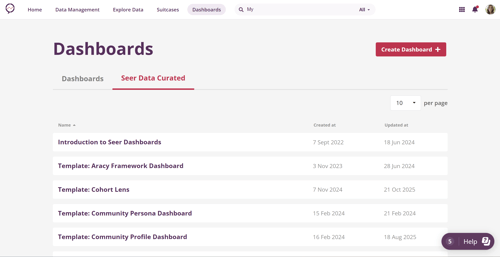
Curated Dashboard templates are included alongside other Dashboards you have access to.
Previewing a Template Dashboard
To preview a Template Dashboard:
-
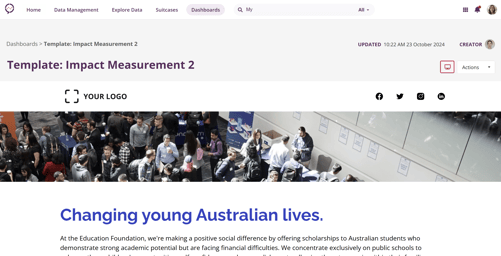
Click on the Dashboard name.
-
The Dashboard will open in preview mode, allowing you to explore its layout and content.
Using a Template Dashboard for your own work
Template Dashboards are read-only until you duplicate them.
To create your own editable version:
-
Open the Template Dashboard you want to use.
-
Click the Actions menu in the top-right corner.
-
Select Duplicate.
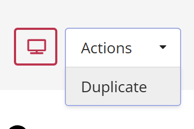
Once duplicated, the Dashboard becomes your own and can be fully edited.
After duplicating
After duplication, you can:
-
Edit charts and embedded Insights
-
Update text, images, and media
-
Adjust layout and styling
-
Tailor the Dashboard to your audience and purpose
You can always find the Dashboard you duplicated by returning to Dashboards in the top menu. All Dashboards you have access to appear there.
Why this matters
Curated Dashboard templates help you get started faster, apply proven design patterns, and focus on meaning and narrative rather than setup. They’re a practical way to turn data into clear, shareable stories.
➡️To learn more, see the article How do I create a Dashboard?