
This article helps you learn how to add new data to an existing dataset, while ensuring you do not get duplicate data, and helps with any error messages you may see.
This article is relevant when you are uploading data via the Self-service Data Collection process, which is found at Data Management > Select an existing dataset > Add Data.

-
When you click Add Data, and upload a file, you are taken through the Data Configuration steps.
-
In the last step, Configuration View, you have the option to either Append your new data to, or Overwrite, your previous data.
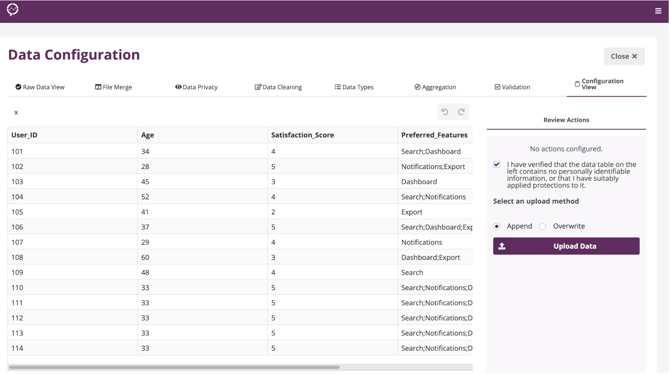
Append: add new information from current upload to existing file.
Overwrite: you would choose this if your new source file has data in it that has already been uploaded and you don't want to duplicate the records, or if previous records are incorrect and you want to change them.
Managing Column Mismatches (only happens on reupload)
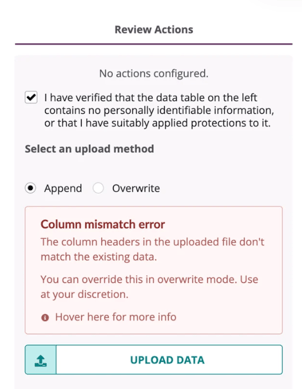
When uploading new Excel or CSV data to an existing dataset, the system will flag any column mismatches. This ensures your new data aligns with the current dataset structure.
Types of Column Mismatches
-
Missing Column: A column in the original dataset is missing from the uploaded data file.
-
New Column Detected: The uploaded data includes a new column not present in the original dataset.
-
Column Order Mismatch: The column order in the new upload does not match the current dataset’s order.
You can hover over the info icon for detailed information on these errors.
Overwriting Existing Data
If you want to replace the current dataset structure with the new upload format:
-
Select "Overwrite" and check the "Force upload" option.
-
Confirm the action in the popup window.
-
Click "UPLOAD DATA".
Note: Overwriting will permanently replace the existing dataset with the new data structure. Ensure that all uploaded data is accurate before proceeding.