![Seer Logo White.png]](https://knowledge.seerdata.ai/hs-fs/hubfs/Seer%20Logo%20White.png?height=50&name=Seer%20Logo%20White.png)
What counts as personal information?
Personal information is any information that identifies a person, or could reasonably be linked to them.
Examples include:
-
Name, address, or phone number
-
Email address
-
Signature
-
Date of birth
-
Medical records
-
Bank details or credit card numbers
-
Opinions about a person
-
Photos where a person is clearly identifiable
Even if a dataset does not include a person’s name, information can still be personal if it can be combined with other details to identify someone.
What is sensitive information?
Sensitive information is a special category of personal data that requires additional protection.
This includes information about a person’s:
-
Health (e.g. medical history)
-
Genetic or biometric profile (e.g. fingerprints)
-
Race or ethnicity
-
Political views
-
Religious beliefs
-
Sexual orientation
-
Criminal history
Sensitive information should not be uploaded unless it has been properly de-identified and approved for use.
Platform requirement
To protect people and communities, the platform requires all users to:
-
Remove personal and sensitive information, or
-
Apply appropriate protections before completing a data upload
Uploads that contain unprotected personal or sensitive information should not proceed.
How to clean or remove personal and sensitive information from your upload
These steps apply when uploading data through Self-Service Data Collection, on the Data Configuration page.
Step 1: Identify personal information
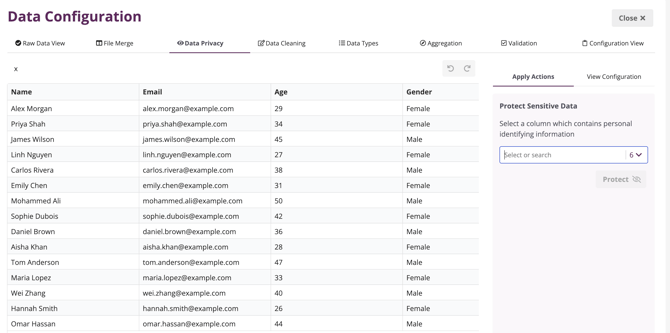
After selecting your data file for upload, move through the setup steps until you reach the Data Privacy tab.
Here, review your columns and identify any that contain:
-
Personally identifiable information, or
-
Sensitive information
Step 2: Protect required identifiers
If a column is needed as a unique identifier (for example, a name or ID):
-
Select the column
-
Choose Protect this data

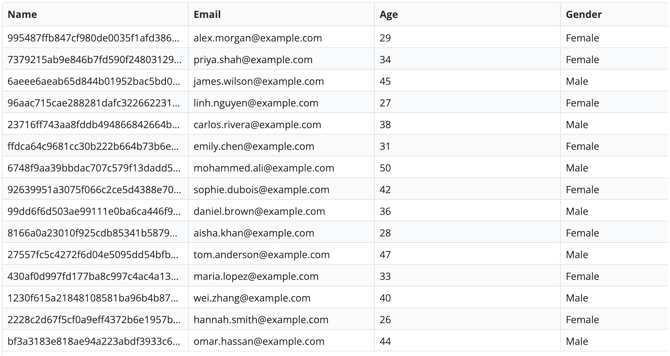
Protected data:
-
Retains a unique identifier
-
Is no longer directly identifiable
For example, you may protect a Name column so it can act as an identifier without exposing personal details.
Step 3: Remove unnecessary personal data
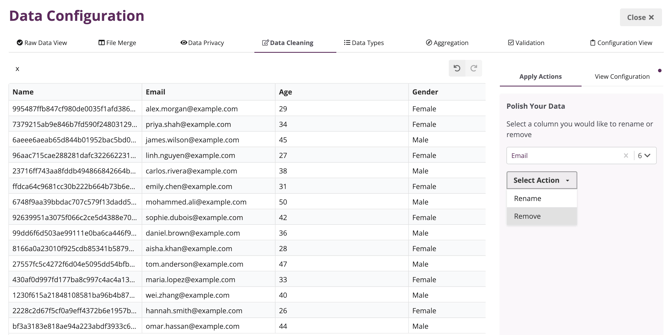
In the Data Cleaning step:
-
Remove any personal or sensitive columns that are not required
-
For example, remove an Email column if it is personal and not needed for identification
Once removed, the column will no longer be included in the upload.
Step 4: Confirm privacy compliance
In the final Configuration View step, you will be asked to confirm that:
-
There is no personally identifiable information in the upload, or
-
Any personal information has been suitably protected
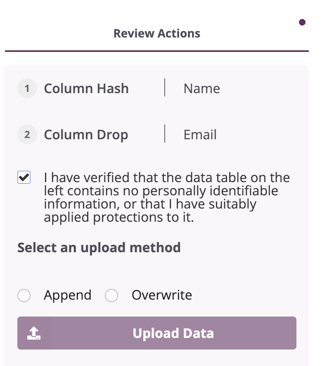
This confirmation is required before the upload can be completed.
Why this matters
Cleaning personal and sensitive information protects individuals, respects privacy and data sovereignty, and ensures data can be shared, aggregated, and analysed responsibly.
Careful handling of personal data builds trust — and trust is essential for using data to inform decisions that affect people and communities.