![Seer Logo White.png]](https://knowledge.seerdata.ai/hs-fs/hubfs/Seer%20Logo%20White.png?height=50&name=Seer%20Logo%20White.png)
Dataset Templates provide a consistent structure for collecting and managing data, especially when multiple contributors are involved. They help ensure data is entered in a clear, repeatable way and can be reliably aggregated later.
What a Dataset Template includes
Each dataset template:
-
Contains one or more Data Tables
-
Has Contributors assigned to it
-
Is managed by Dataset Moderators
-
Tracks contributor update history for the Data Tables it contains
Each Dataset Template acts as a controlled space where data is collected, reviewed, and maintained over time.
How do I create a Dataset Template?
To create a new Dataset Template:
-
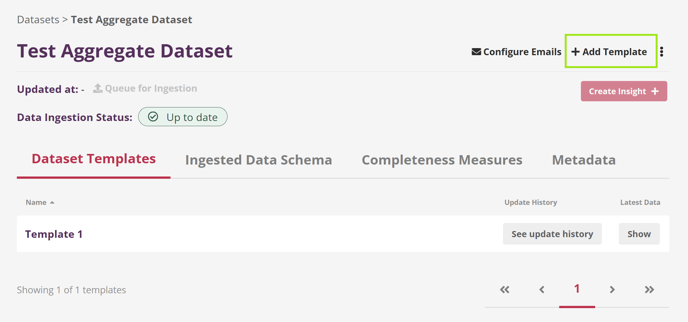
Navigate to the relevant Aggregate Dataset.
-
Click Add Template.
-
Enter a name for the Template when prompted.
-
Once created, you can:
-
Create Data Tables within the Template
-
Add Contributors
-
Customise Welcome and Reminder emails for contributors
-
You can learn more about:
➡️Creating Data Tables in this article
➡️Inviting Contributors in this article
➡️Setting up custom email content in this article
How do I duplicate a Dataset Template?
To duplicate an existing Dataset Template:
-
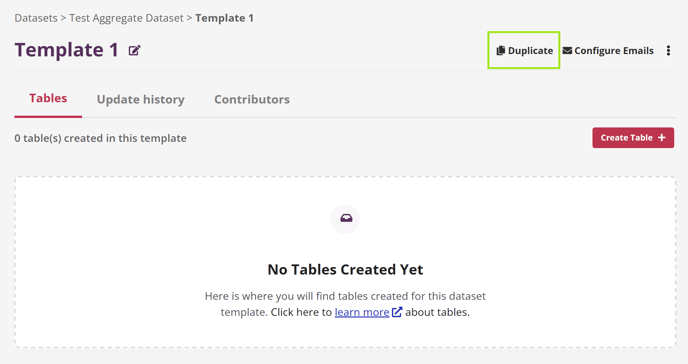
Open the Dataset Template you want to copy.
-
Click Duplicate from the menu.
-
A copy of the Template will be created within the same Dataset.
💡Duplicating a Template is useful when you want to reuse a proven structure without rebuilding it from scratch.
Why this matters
Dataset Templates bring structure and consistency to data collection. By grouping related tables, contributors, and communication in one place, they make it easier to manage data responsibly and turn contributions into reliable, shared insight.