![Seer Logo White.png]](https://knowledge.seerdata.ai/hs-fs/hubfs/Seer%20Logo%20White.png?height=50&name=Seer%20Logo%20White.png)
Embedding your Dashboard into your website
Embedding a Dashboard allows you to display a live version of the Dashboard without the surrounding platform interface. You can embed any Dashboard that you own or have full access to, as long as the destination site supports HTML embeds.
Creating an HTML embed code
To embed a Dashboard:
-
Open the Dashboard you want to embed.
-
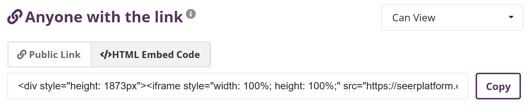
Next to Anyone with the link, open the dropdown.
-
Select Can view.
-
Click </> HTML Embed Code.
-
Copy the generated embed code.
-
Paste the code into your website’s HTML editor.
The embedded view will display only the Dashboard content itself, not the wider platform interface.
Keeping embedded Dashboards up to date
Once embedded:
-
The Dashboard will automatically update to reflect any changes you make in edit mode.
-
Updates will continue to appear in the embedded version as long as the Dashboard remains publicly visible.
Why this matters
Embedding Dashboards makes it easy to share live, trusted data in the places people already go — such as websites, intranets, or reporting portals without duplicating or manually updating content.