![Seer Logo White.png]](https://knowledge.seerdata.ai/hs-fs/hubfs/Seer%20Logo%20White.png?height=50&name=Seer%20Logo%20White.png)
Variable grouping
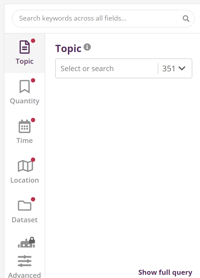
Variables are grouped by type once data is made available in Explore Data. These groupings determine where Variables appear and how they behave.
There are four Variable types:
-
Topic
-
Quantity
-
Time
-
Location
These types are the same as those shown in the Explore Data tool.
Quantity variables
Measured quantity always appears under Quantity.
-
This is the only Variable classified as a Quantity type
-
It is a numeric (metric) Variable
-
Its Categories represent measurements such as:
-
Number of people
-
Completion rate
-
Percentage
-
Count
-
Because this Variable defines what is being measured, it must always be numeric.
Topic variables
Topic Variables include all Variables that are not classified as Quantity, Time, or Location.
They are used to describe what the data is about, such as:
-
Program type
-
Service category
-
Demographic group
-
Outcome area
Topic Variables provide contextual meaning but do not require special formatting.
Time variables
Time Variables represent when something occurred. These Variables must use specific naming and category formats in order to support auto-refreshing Insights.
Auto-refreshing Insights automatically update as new time periods are added to the Dataset. To enable this, Time Categories must follow recognised formats.
Supported Time Variables
Common Time Variable names include:
-
Year
-
Year Ending December
-
Financial Year
-
Year Month
-
Year Quarter
-
Year Range
-
Year School Term
-
Year Semester
-
Date
-
Week Starting
-
Week Ending
-
Grant Start / End / Approval (Year, Month, Quarter)
Required Time Category formats
Below are the accepted formats for Time Categories.
| Time Variable | Accepted format(s) | Example(s) |
|---|---|---|
| Year | YYYY | 2026 |
| Year Ending / Year Month | YYYY M | 2025 December |
| Financial Year | YYYY-YY | 2025-26 |
| Year Quarter | YYYY M-M |
2030 Jan–Mar 2030 Apr–Jun |
| Year Range |
YYYY-YY YYYY-YYYY |
2019-20 2020-2025 |
| Year School Term | YYYY T# |
2023 T1 2023 T2 |
| Year Semester | YYYY S# |
2019 S1 2019 S2 |
| Date |
DD-M-YYYY D/M/YYYY D M YYYY YYYY-M-D |
01-Dec-2021 14/12/2021 18 Feb 2021 2022-12-12 |
| Week Starting / Week Ending |
YYYY-MM-DD DD/MM/YY |
2022-10-11 1/6/26 |
⚠️ If Time Categories do not follow these formats, Insights built on them cannot auto-refresh.
Location variables
Location Variables describe where data applies and are grouped automatically when recognised.
Common Location Variables include:
-
Indigenous Region (IREG)
-
Indigenous Area (IARE)
-
Local Government Area (LGA)
-
Postal Area (POA)
-
State Suburb (SSC)
-
Suburb and Locality (SAL)
-
Statistical Area Level 2 (SA2)
-
Statistical Area Level 3 (SA3)
-
Statistical Area Level 4 (SA4)
-
Greater Capital City Statistical Area (GCCSA)
-
State or Territory
-
Country
-
Primary Health Network
-
Region, District, Division
-
Delivery Postcode
-
Recipient Postcode
Using standard Location Variable names improves consistency and makes geographic filtering and comparison easier in Explore.
Why this matters
Clear, consistent Variable naming:
-
Ensures Variables appear in the correct place in Explore Data
-
Enables features like auto-refreshing Insights
-
Makes data easier to understand for non-technical users
-
Supports reliable aggregation and comparison over time and place
Spending time on Variable naming upfront helps avoid rework later and strengthens confidence in the Insights built from your data.