![Seer Logo White.png]](https://knowledge.seerdata.ai/hs-fs/hubfs/Seer%20Logo%20White.png?height=50&name=Seer%20Logo%20White.png)
Suitcases can be nested inside other Suitcases, allowing you to organise Insights by topic and sub-topic. This makes it easier to group related Insights and navigate larger collections over time.
Creating a Suitcase
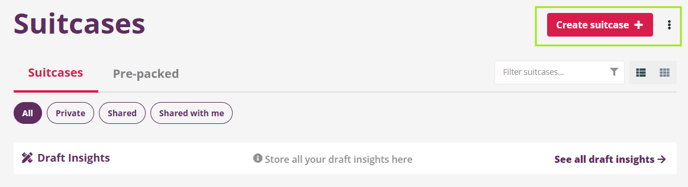
On the Suitcases page, you can create a new Suitcase by clicking on the Create suitcase + button and giving your Suitcase a title and summary.
Creating a Suitcase inside another Suitcase
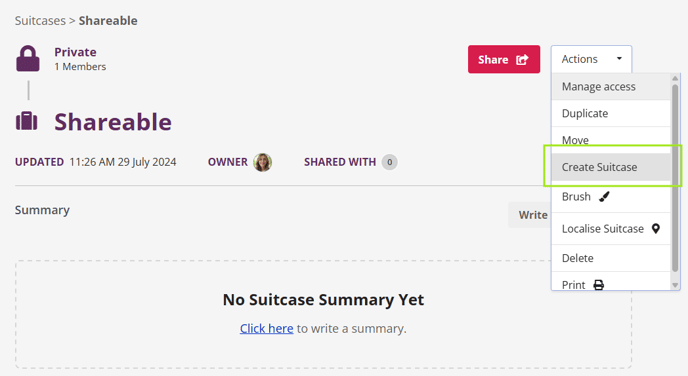 To create a nested (child) Suitcase:
-
From the Suitcases page, either:
-
Create a new Suitcase, or
-
Open the Suitcase you want to use as the parent.
-
-
Once inside the parent Suitcase, click Actions.
-
Select Create Suitcase.
-
Enter a name for the new Suitcase when prompted.
Viewing nested Suitcases
After creating a nested Suitcase:
-
It will appear within the parent Suitcase, listed alongside any existing Suitcases or Insights.
-
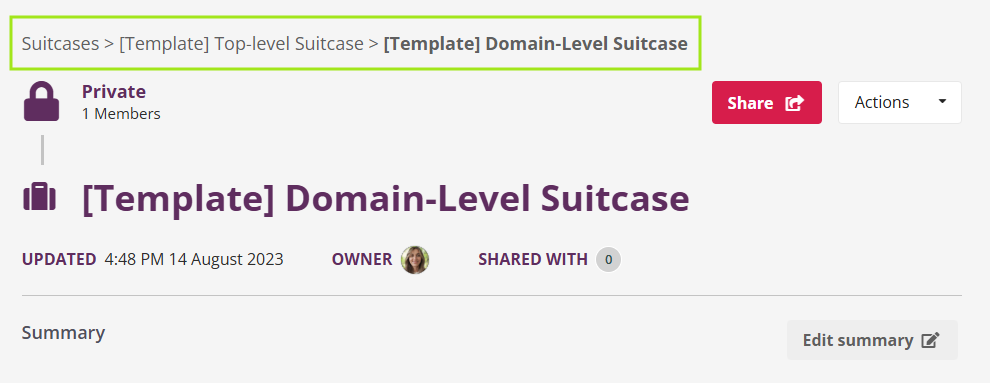
The breadcrumb menu at the top of the page will show its position in the folder structure.
-
A counter will indicate how many Insights are contained within the nested Suitcase.
Adding more Suitcases
You can continue building your folder structure by:
-
Repeating the same process, or
-
Clicking Create Suitcase directly from within the current Suitcase page
This allows you to create multiple levels of organisation as needed.
Why this matters
A clear Suitcase structure helps keep Insights organised, discoverable, and easy to share — especially as collections grow over time. Thoughtful organisation supports clearer storytelling and more confident use of Insights across teams.