![Seer Logo White.png]](https://knowledge.seerdata.ai/hs-fs/hubfs/Seer%20Logo%20White.png?height=50&name=Seer%20Logo%20White.png)
Adding a comment
-
Open the Suitcase or Insight you want to comment on.
-
Scroll to the bottom of the page.
-
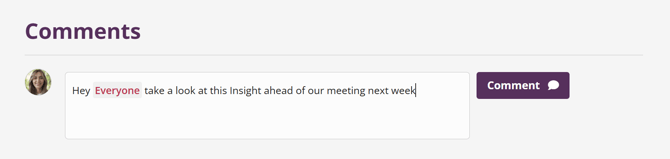
Enter your comment in the comment box.
Tagging people in comments
In your comment, you can tag:
-
Everyone with access to the Suitcase using
@everyone, or -
Specific individuals by typing
@followed by their name
(for example:@Stephen,@Annie,@Jamal,@Lee)
Notifications
When someone is tagged in a comment:
-
They will receive a notification email
-
The comment will also appear in their platform notifications
This helps ensure feedback and questions are seen and responded to promptly.
Why this matters
Commenting keeps collaboration close to the Insights themselves, reducing back-and-forth and helping teams work together with shared context and clarity.