![Seer Logo White.png]](https://knowledge.seerdata.ai/hs-fs/hubfs/Seer%20Logo%20White.png?height=50&name=Seer%20Logo%20White.png)
Before you begin, it’s helpful to understand who this guide is for.
This article is written for Dataset Moderators — the people responsible for setting up datasets, managing structure, and deciding how data is collected and shared.
If you’re a Contributor (someone invited to add data to a dataset, often without access to configuration or admin settings), you’ll find more relevant guidance in this article instead.
Understanding the different roles
In Self-Service Data Collection, there are two main roles:
-
Dataset Moderators
Dataset owners or administrators who configure datasets, create data tables, invite contributors, and control how data is shared. -
Contributors
People who have been invited to submit data to a dataset. Contributors can add or edit data they’ve been given access to, but they don’t manage dataset settings or structure.
Understanding this distinction will help you navigate the platform with confidence.
Start with the core concepts
If you’re new to Self-Service Data Collection, we recommend starting with these short explainers:
- What is Self Service Data Collection?
- What are Contributors?
- What are Dataset Moderators?
- What is a Data Table?
- How to use Unit Record Data Ingestion
- What's the difference between Unit Record and Aggregate data?
These concepts form the foundation for everything that follows.
Working with Unit Record Level data files
Unit Record Level data, also known as microdata, is defined as a dataset of “unit records”, where each record contains information about the “unit”.
Imagine a dataset full of census information. You might expect each row of the dataset to represent a single person. This would mean that the unit is a person, and therefore, the unit records are information about each person.
The platform enables easy upload, transformation and ingestion of URL data as CSV or XLSX files. The URL upload tool enables you to:
-
Upload and merge up to 2 data files
- Protect sensitive data
- Clean your data file by removing or renaming columns
- Set data types and validations
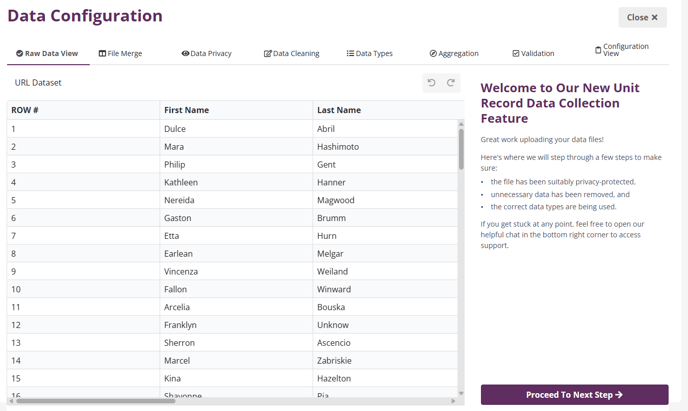
Step through the process here!
Create Aggregate Data Table
Aggregate data, also known as macrodata or tabular data, is produced by grouping information into categories and combining values within these categories. Aggregate tables can be configured by a moderator and then shared with external contributors for easy data collection.
Follow this guide to get started:
If you are ready to dive deeper on Data Tables you can access more helpful articles in the Working with Data Tables section, but you don’t need to read them all right away. The basics are enough to begin collecting data.
Add data and invite Contributors (optional)
After your Data Table is set up, you can start adding data in one of two ways:
-
Add data yourself as a Moderator
Open your Data Table and select Edit Data to enter information directly. -
Invite Contributors to add data
If others will be contributing data, these articles will help you get set up:
Contributors will only see what they need to submit data — they won’t have access to dataset configuration or admin settings.
Share your dataset for analysis and insights
Once your dataset contains data, you can make it available on the platform so others can explore, analyse, and generate insights.
To share your dataset, see:
- How do I share my dataset with my organisation or a partner organisation?
- How do I share my dataset with an individual?
Note: All new data first passes through a staging and ingestion process. Learn how to ingest your data here.
What’s next
That’s all you need to get started with Self-Service Data Collection.
If you’d like to go further, you can explore the other articles in the Data Collection section at your own pace — they’re there to support you as your datasets and use cases grow.