![Seer Logo White.png]](https://knowledge.seerdata.ai/hs-fs/hubfs/Seer%20Logo%20White.png?height=50&name=Seer%20Logo%20White.png)
Adding an Insight to a Dashboard
To embed an Insight:
-
Open the Dashboard editor.
-
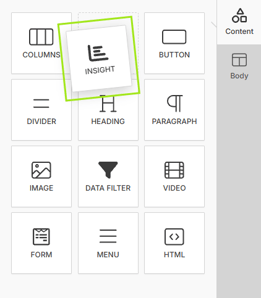
From the Content tab, drag an Insight block onto the Dashboard canvas.
-
The Insight block appears in the middle of the top row by default.
-
-
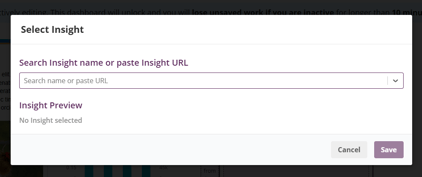
In the block configuration panel, click Select Insight.
-
Use the searchable dropdown to:
-
Find and select an Insight, or
-
Paste the URL of the Insight you want to embed.
-
Once selected, the Insight will appear in the Dashboard.
Insight block configuration options
The Insight block includes additional settings to control how the Insight is displayed.
Charts per row
This setting is useful for Insights that contain multiple charts (for example, when using Series).
-
Choose how many charts appear in each row
-
For example, setting this to 3 displays charts as if they were placed in three columns
Hide chart legend
-
Toggle this option to show or hide the Insight’s chart legend
-
Useful when space is limited or labels are already clear
Visibility and sharing considerations
⚠️ Insight visibility depends on Suitcase access
-
If an Insight is inside a Suitcase that is not publicly shared, it will not be visible to:
-
Public viewers, or
-
Users who do not have access to that Suitcase
-
Making embedded Insights publicly visible
To ensure embedded Insights are visible publicly:
-
Update the sharing settings on the Suitcase that contains the Insight.
-
Enable Anyone with the link can view.
-
Edit the Dashboard and re-add the Insight block.
-
This refreshes the link to point to the public version of the Insight.
-
Why this matters
Embedding Insights in Dashboards brings data, interpretation, and context together in one place. Understanding visibility and sharing rules helps ensure Dashboards work as expected for every audience.