
When data is added to a self-service dataset—whether it’s uploaded via a URL dataset or entered into an aggregate table—it doesn’t become available straight away. To protect data quality and ensure confidence in what people see and use, all new data first passes through a staging and publishing process.
This article walks you through that process step by step, so you know what to expect and when your data will be ready for exploration.
Step 1: Data enters the staging area
When data is uploaded or entered (by a moderator or an external contributor), it is held in a data staging area.
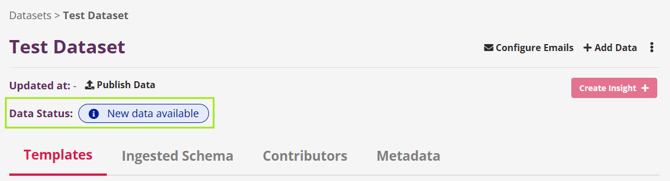
At this point, the dataset status updates to New Data Available.
This staging step ensures new data can be reviewed and processed safely before it becomes part of the live dataset.
Step 2: Publish the data
To move the data forward, a moderator must publish it.
Click the Publish Data button to send the staged data into the data pipeline. Once kicked-off, the process begins automatically.
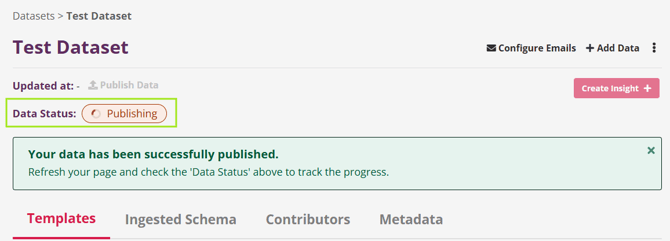
As the data moves through the pipeline, the dataset status will update in real time:
-
New Data Available → Publishing → Up to Date
This process may take a few minutes, depending on the size and structure of the data.
Step 3: Data becomes available to use
When the Publish process is finished:
-
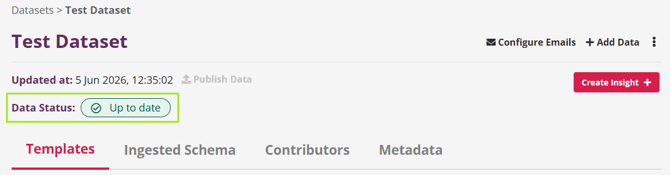
The dataset status changes to Up to Date
-
The Updated at date refreshes
-
The new data becomes available for:
-
Exploration
-
Insight building
-
Reporting and analysis
-
At this point, your dataset reflects the most current, trusted version of the data.
What this means for your work
This process helps ensure that every dataset people rely on is current, governed, and ready to support confident decisions. By clearly separating data entry, review, and availability, the platform protects data quality while keeping the workflow simple and transparent.
If you don’t see new data reflected immediately, check the data status—it will always show you exactly where things are in the process.